Set the ground plane
What is ground plane calibration?
Ground plane calibration sets the 3D world so that “up” (the Z axis) means up and the ground is where it should be. Instead of using a camera’s perspective to define the world (which can lead to the 3D data coming on oriented oddly), it uses a flat ChArUco board placed on the floor to set the origin and upright orientation. This helps the triangulated data come in with the subject’s feet on the ground and their body standing tall - as opposed to having to rotate the subject onto the floor in post-processing. Below is an example of the output 3D data that was reconstructed using the ground plane calibration feature - with no additional rotations applied.
Quick overview: recording a ground plane calibration
Overall, the process is relatively similar to how you record a default calibration. There are two key differences:
- You'll enable the
Align to initial Charuco ground planetoggle in the calibration settings of the FreeMoCap GUI before you record or process your calibration - When recording a calibration video, you must start the recording with the board on the ground, un-obscured and visible to all cameras for a few seconds
And that's the short-and-sweet version. Detailed instructions follow below.
How to use ground plane calibration
1. In the software, check the Align to initial Charuco ground plane toggle
In the Calibration panel, open the ChArUco board settings and check Align to initial Charuco ground plane.
A. If recording your calibration through the FreeMoCap software:
check the Align to initial Charuco ground plane toggle, choose Record and Calibrate, and record your calibration as described in calibrate your cameras. Set all other parameters (for example square size, board choice) as normal.
B. If calibrating an existing or externally recorded calibration recording:
check the same Align to initial Charuco ground plane toggle, then use Import Calibration videos to select the folder containing your synchronized_videos and run the calibration on it. Set all other parameters (for example square size, board choice) as normal.
2. Recording calibration videos to use with ground plane
Start your calibration recording with the board flat on the ground.
At the start of your calibration - have your ChArUco board flat on the ground, making sure it is visible to all cameras Leave it on the ground for a few seconds, and then proceed with calibration as normal. Here's an example below.
3. Processing your ground plane calibration
After recording your calibration videos through the software, or calibrating an existing recording, your calibration begins to process as normal with one extra step. After running through the normal intrinsics/extrinsics calculation, FreeMoCap attempts to set the ground plane to be the ChArUco board
The software triangulates the ChArUco corners in 3D across all frames of the calibration recording, then searches for the longest contiguous run of frames in which the board satisfies these conditions:
- The board is stationary: frame-to-frame motion (the median displacement of the corners visible in consecutive frames) stays below 2 mm per frame, and the stable run must last at least 10 frames
- Enough corners are well observed: within that stable window, each corner used must be detected in at least 3 frames, and at least 3 non-collinear corners must survive
If a suitable stretch of frames is found, the board detections in it are averaged and used to build a new set of 3D axes, explained below.
How ground plane calibration works
Ground plane calibration redefines the world coordinate system using the orientation of the ChArUco board. The known board geometry (each corner's position on the board, in millimeters) is rigidly fitted to the triangulated corner positions using a Kabsch (orthogonal Procrustes) fit over all well-observed corners, rather than relying on specific individual markers:
- The origin
(0, 0, 0)is set to corner 0 of the ChArUco board (the location of marker 0 on a 7x5 and 5x3 board is shown in the figure below) - The X and Y axes come from the fitted board pose itself. X runs along the board edge in the
squares_xdirection and Y along the edge in thesquares_ydirection, so they always follow the printed board regardless of which corners happened to be visible - The Z axis is the board's normal vector, oriented to point toward the cameras (and therefore up out of the floor)
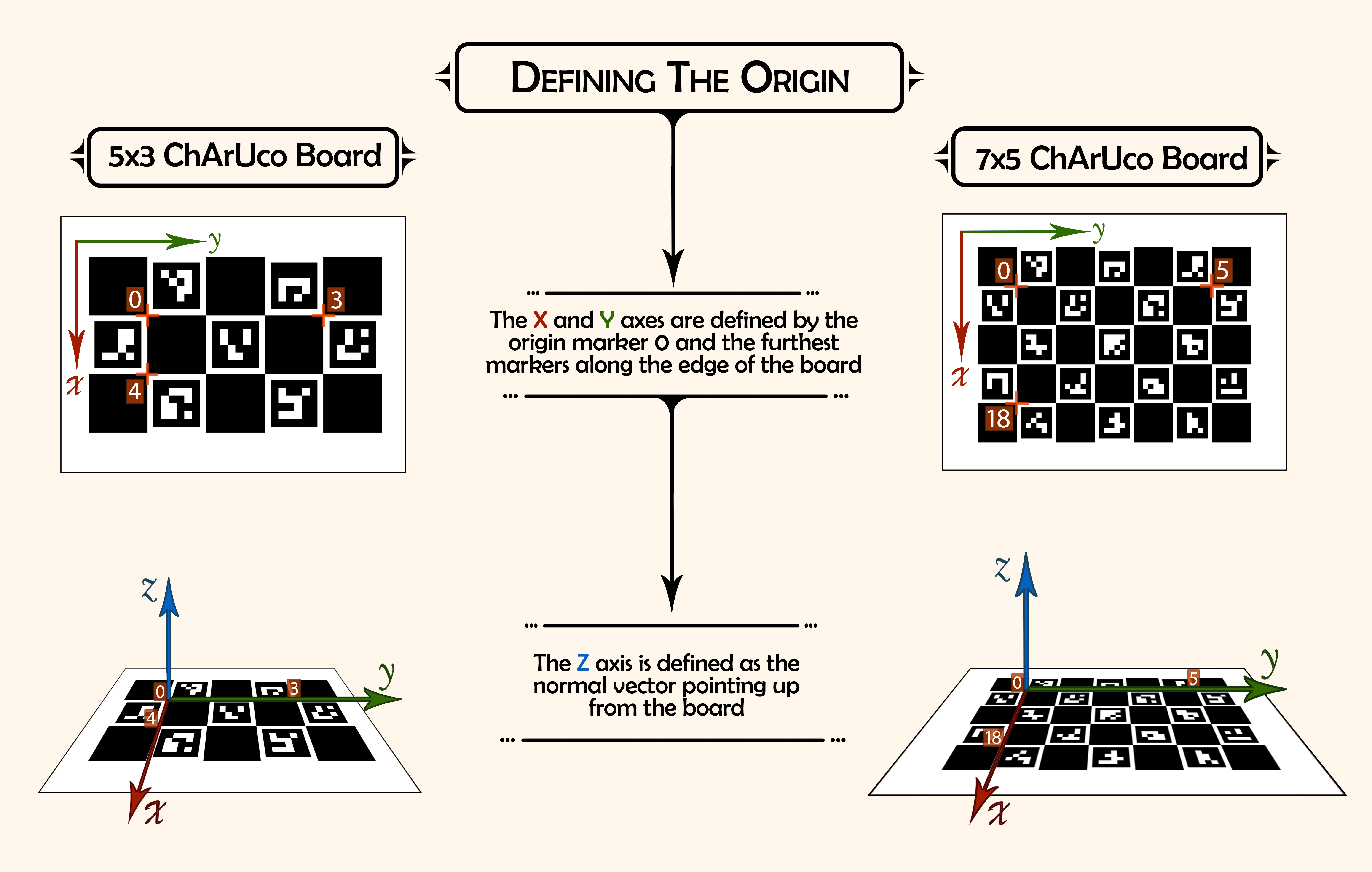
4. Ground plane calibration results
With a successful ground plane calibration, the origin of the world is set to marker 0 of the ChArUco board, and the subject comes in standing upright in the +Z direction, with their feet at Z=0. This is most evident in looking at the data viewer in the FreeMoCap GUI - as you can see in the example below.
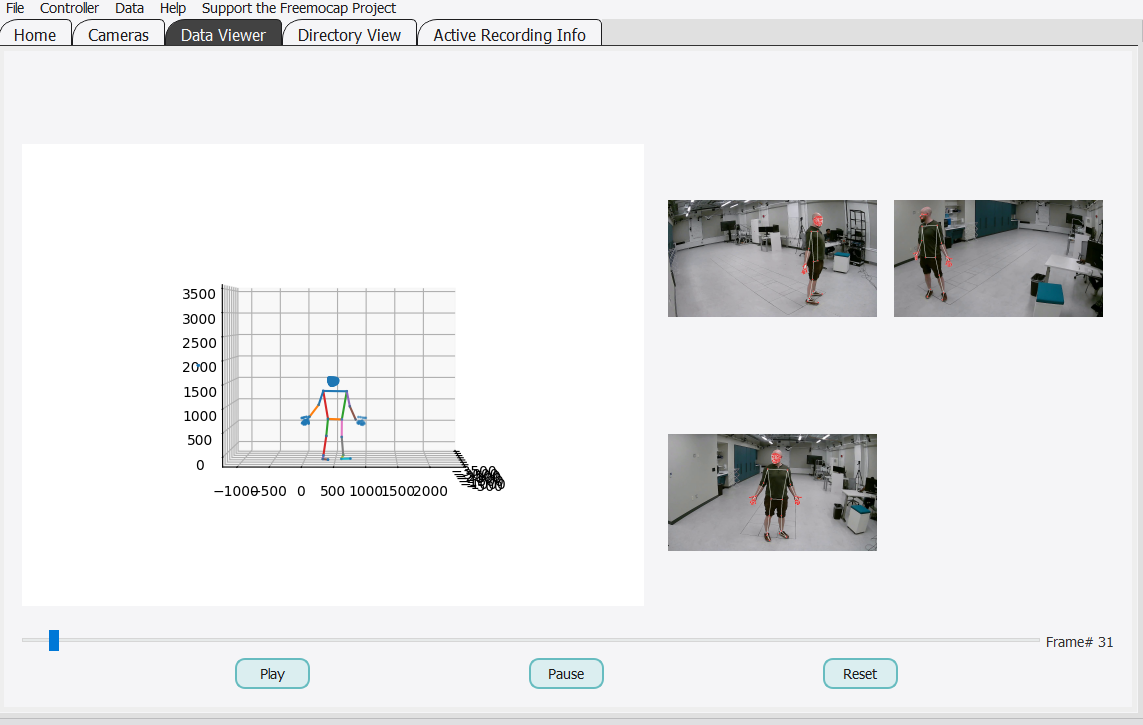
The output calibration TOML also records whether a ground plane calibration succeeded. When it did, a groundplane_applied = true entry is written in the [metadata] section of the file.
Possible errors
If the ground plane calibration fails, the software instead uses the default calibration (the failure is logged as a warning, and calibration completes without the ground plane alignment). There are a couple of known reasons this may happen.
1. CharucoStabilityError
This error is raised when no contiguous run of frames stays still enough to define the ground plane. Either no run of frames remained below the 2 mm/frame motion threshold at all, or the longest stable run was shorter than the minimum of 10 frames. Double-check and make sure the board was completely flat and still for the first few seconds of the recording.
2. CharucoVisibilityError
This error is raised when none of the ChArUco corners were seen often enough (at least 3 frames) within the stable window to estimate the board. In this case, the ChArUco board may be too far from the cameras when on the ground to get a good track - consider whether you can adjust your camera setup or your board placement to make it more visible to all the cameras.
3. CharucoGeometryError
This error is raised when fewer than 3 corners survived, or when the surviving corners are collinear (all lying along a single line), so they cannot define a 2D board frame. As with the CharucoVisibilityError, this can happen if the board was too far away from the cameras to get a good track of it.
How is ground plane calibration different from default calibration?
By default, the world coordinate system is defined by the location and orientation of Camera 0, which tends to be the camera that took the first video in the synchronized_videos folder. This means:
- The origin
(0, 0, 0)is placed at the optical center of Camera 0 - The world axes align with Camera 0’s coordinate frame: +Z points outward from the lens, +X to the right, and +Y downward in the image
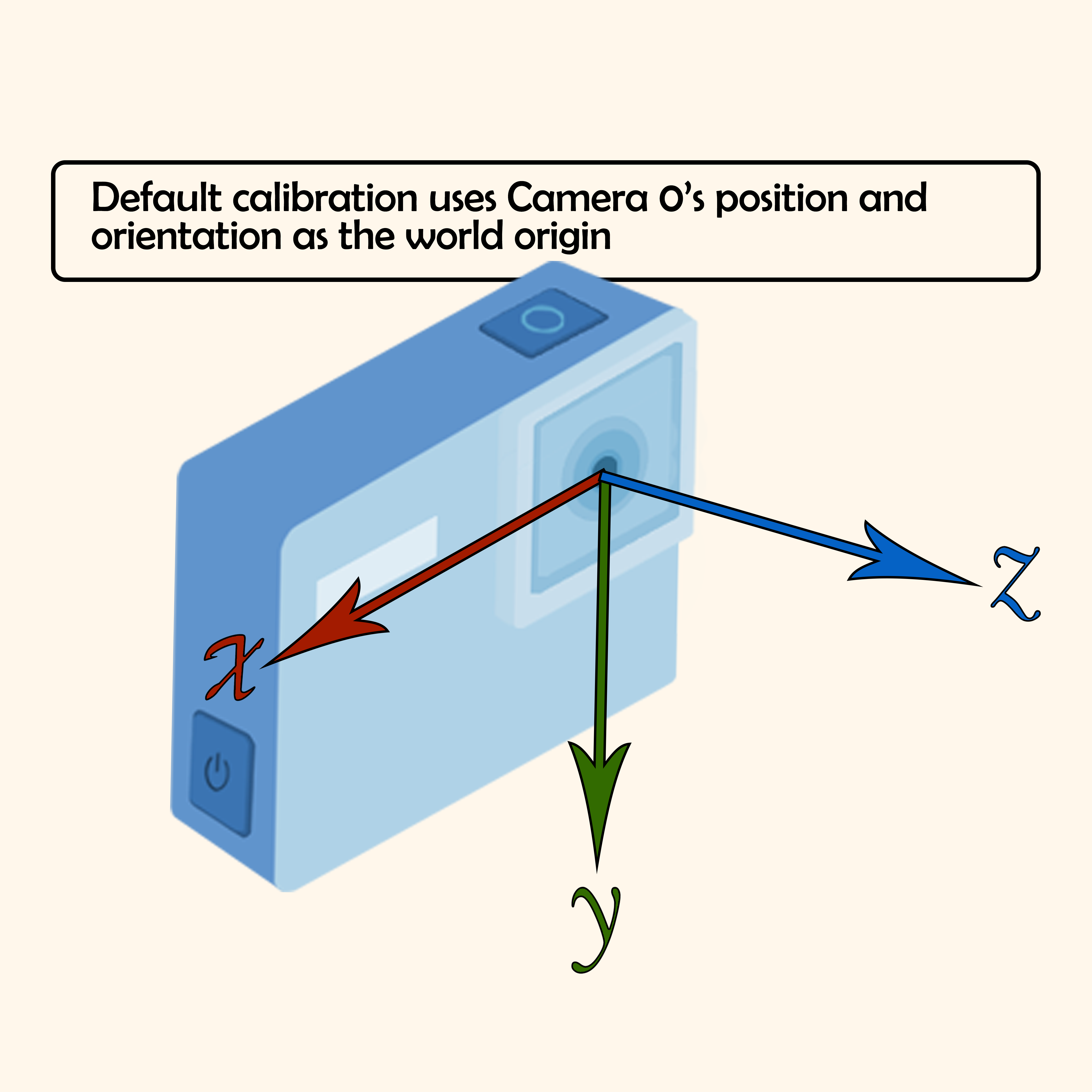
As a result, reconstructed 3D data (for example skeletons) often comes in aligned to the camera's perspective rather than to the physical environment, which means subjects may come in lying sideways instead of standing upright (see image below for an example).
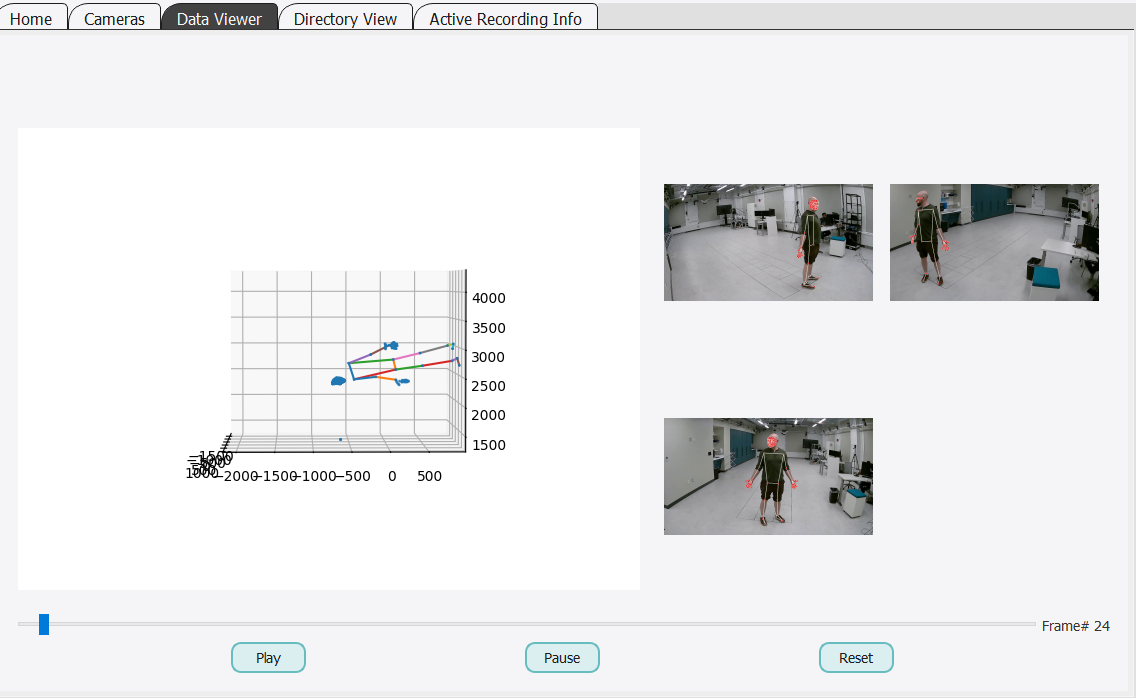
While FreeMoCap rotates the reconstructed 3D data to make it appear upright and place the feet on the ground before exporting to Blender, it’s far more reliable to ensure the data is aligned correctly from the start.